📖 Lesson content
Video
What is tool use?
Your existing workflows rely on a lot of different technologies — project management software, databases, files. Claude can't just check these things itself. Instead, it relies on tools, which give Claude access to external data and actions.
What a tool is
Simply put, a tool is a function you define and expose to Claude. You describe what it does and what inputs it takes, and Claude decides when to call it.
Here's the key thing to internalize: Claude doesn't execute the tool — your code does. The flow looks like this:
- Claude requests a tool call.
- Your code executes the function.
- The result goes back to Claude, and it keeps going.
How tools are defined
Tools are JSON schemas with three parts: a name, a description, and an input schema. You pass them to Claude in the request body as a tools array.
The description is what Claude reads to decide whether to call the tool. If you write a vague description, you get bad tool use. This is the number one reason agents misfire or don't grab the tools that are available to them. Be specific.
Here's what a tool definition looks like:
{
  "name": "lookup_building_code",
  "description": "Look up a specific building code section by its identifier. Returns the full text of that code section.",
  "input_schema": {
    "type": "object",
    "properties": {
      "section": {
        "type": "string",
        "description": "The building code section to look up"
      }
    },
    "required": ["section"]
  }
}
So what happens when we use this? Say we send an agent a compliance report. On the first turn, Claude comes back with stop_reason: "tool_use" — that's our signal. Here's what that response looks like:
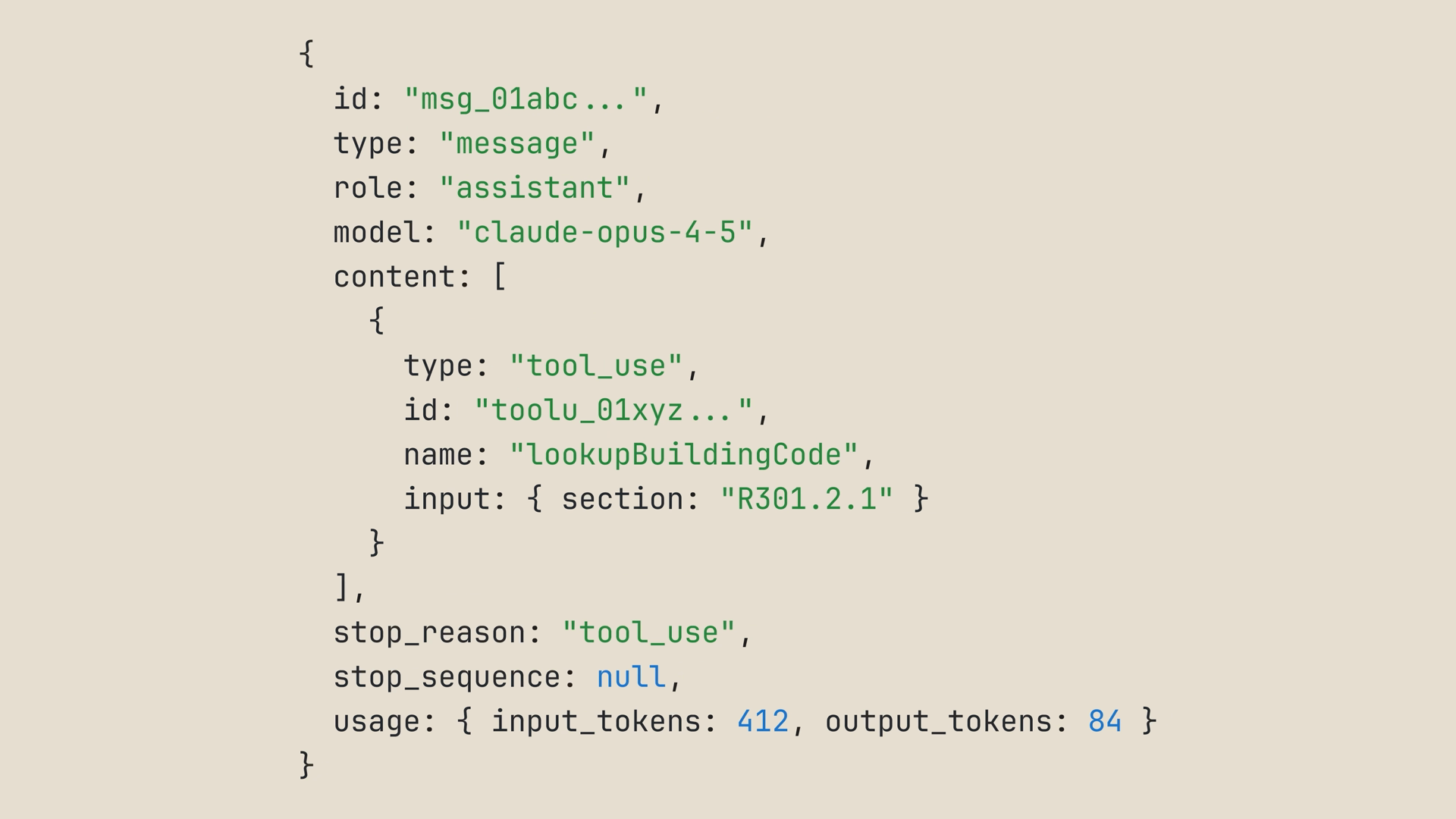
Our loop calls lookup_building_code with the parameter Claude requested, then feeds the result back as a tool result — a user message containing a tool_result block tied to the tool call's id:
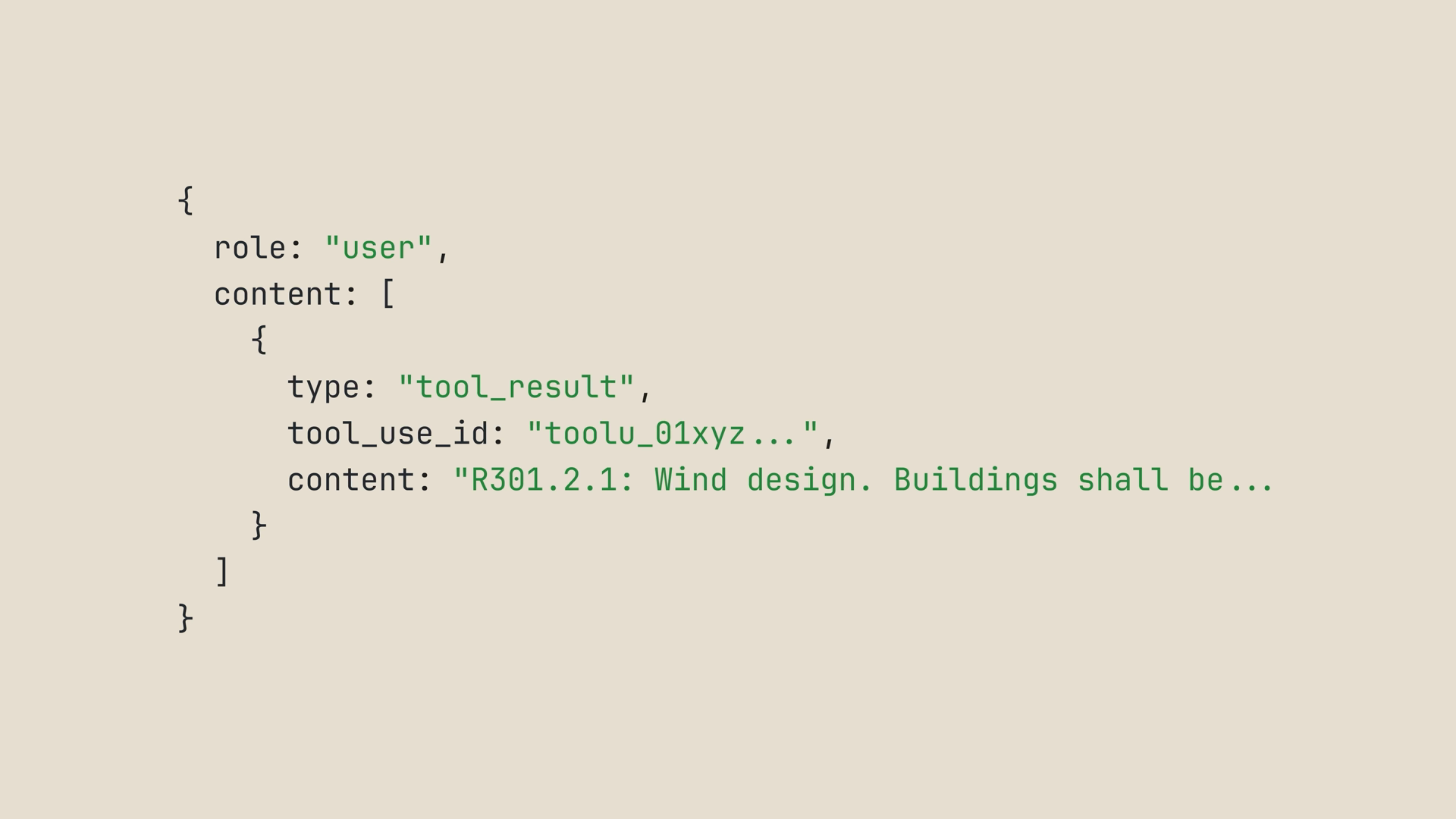
And Claude keeps going. At that point, we can keep calling tools and returning results to Claude until it has what it needs.
Multiple tools: letting Claude pick
One tool is useful, but the interesting part is giving Claude multiple tools and watching it pick which one to use, in what order.
Picture this scenario: you're packing for a three-day trip to Denver, and you want both today's weather and the forecast for the next few days. So we declare two tools instead of one:
const tools = [
  {
    name: "get_weather",
    description: "Get today's current weather for a city.",
    input_schema: {
      type: "object",
      properties: {
        city: { type: "string", description: "The city to check" }
      },
      required: ["city"]
    }
  },
  {
    name: "get_forecast",
    description: "Get the weather forecast for the next few days for a city.",
    input_schema: {
      type: "object",
      properties: {
        city: { type: "string", description: "The city to check" }
      },
      required: ["city"]
    }
  }
];
The loop is identical to the agent loops we've already seen. The only new piece is a runTool function that dispatches on the tool name with a switch statement — this block of code is just where your code actually runs:
function runTool(name, input) {
  switch (name) {
    case "get_weather":
      return getWeather(input.city);
    case "get_forecast":
      return getForecast(input.city);
  }
}

while (true) {
  const response = await client.messages.create({
    model: "claude-sonnet-4-6",
    max_tokens: 1024,
    messages,
    tools,
  });

  if (response.stop_reason !== "tool_use") {
    // Claude is done — this is the final answer
    break;
  }

  messages.push({ role: "assistant", content: response.content });

  const toolResults = response.content
    .filter((block) => block.type === "tool_use")
    .map((block) => ({
      type: "tool_result",
      tool_use_id: block.id,
      content: runTool(block.name, block.input),
    }));

  messages.push({ role: "user", content: toolResults });
}
And that's the whole pattern. Want a third tool? Add it to the array, add a case to the switch, and you're done.
Run this, and you'll see Claude call get_weather and then get_forecast — sometimes in the same turn, sometimes one after the other. Then it answers: pack layers, expect snow flurries today, warming through the week.
Now notice how Claude chose. It read the descriptions, mapped your prompt to "today's weather" and "the next few days," and picked the right tool for each. That's why your tool descriptions really matter.
The tool runner: skip the boilerplate
You've probably already spotted two red flags with what we just wrote:
- That's a lot of code for two simple lookups.
- In a real codebase, you don't want to handwrite JSON schemas for every function you have. It's like writing your code twice.
That's where the tool runner comes in. It ships in the Claude SDK for TypeScript, Python, and Ruby. The runner takes your actual functions, reads the types and docs to build the schema for you, and handles the entire tool use / tool result loop internally.
Your code shrinks down to: describe the tool, send the prompt, wait for the result. Here's the same two-tool weather demo wired through the tool runner:
// The same two lookups we ran by hand — just plain TypeScript functions
function getWeather(city: string) {
  // ...existing lookup
}

function getForecast(city: string) {
  // ...existing lookup
}

const runner = client.beta.messages.toolRunner({
  model: "claude-sonnet-4-6",
  max_tokens: 1024,
  messages: [
    {
      role: "user",
      content:
        "I'm packing for a three-day trip to Denver. What's the weather today and over the next few days?",
    },
  ],
  tools: [getWeather, getForecast],
});

// Returns the final assistant message after all the tool ping-pong has settled
const finalMessage = await runner.untilDone();
Same scenario, a fraction of the code:
- No while loop, no stop reason switch, no manually pushing tool results back into messages — the runner handles all of that.
- No JSON schemas, so you don't write things twice.
- The two functions are the same lookups we ran by hand a minute ago, just plain TypeScript.
runner.untilDone()returns the final assistant message once everything has settled.
Run it, and you get the same answer.
Real tools wrap your existing code
In real life, your tools wouldn't be hardcoded weather data. They'd wrap actual functions you already have in your application.
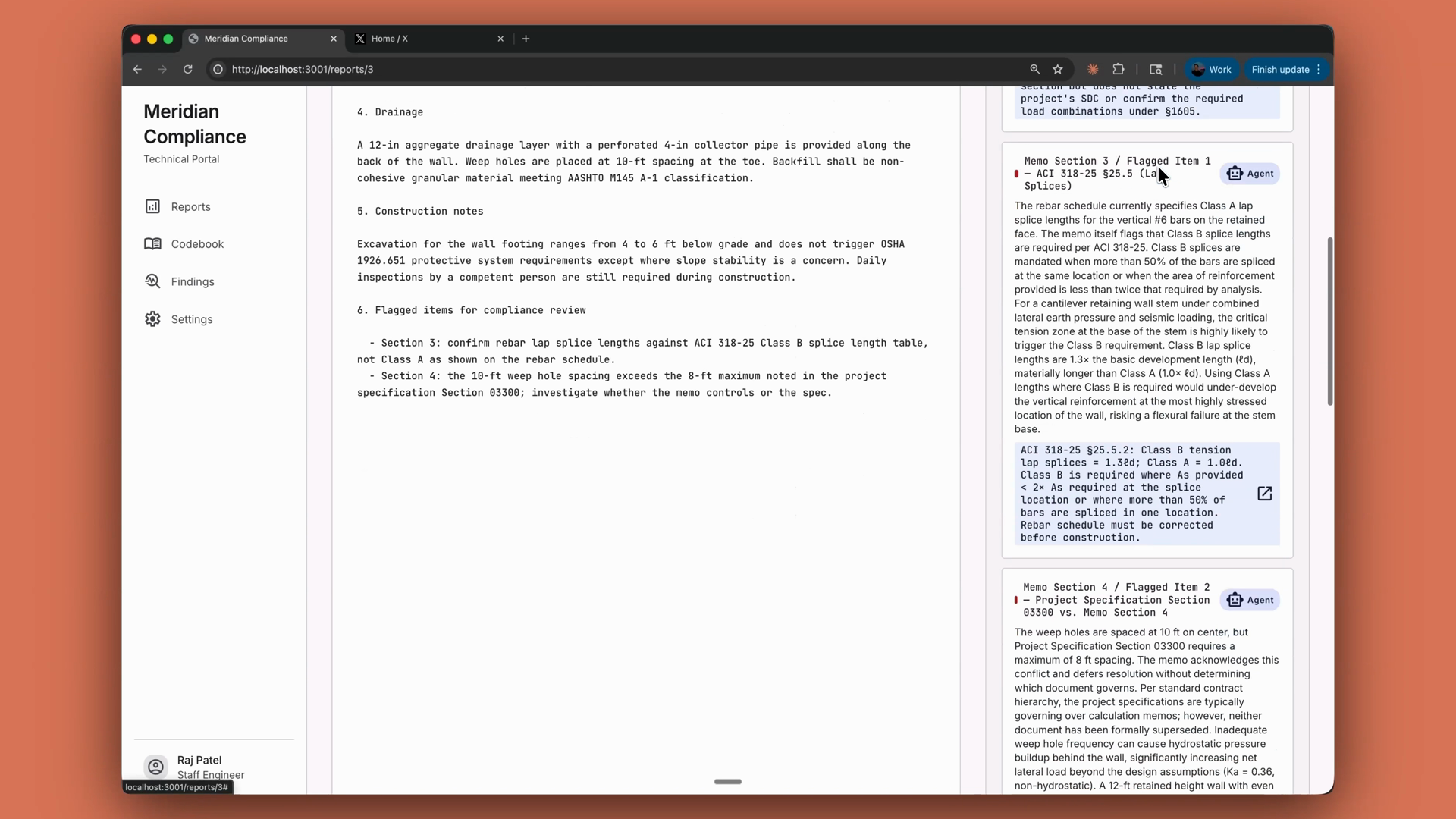
Take a compliance review agent: its tools are thin wrappers around lookup_building_code and search_building_code functions that already exist in the codebase. With the tool runner, you pass those functions in directly, and the agent cites specific code sections in every finding it writes — no schema writing required:
Recap
- Tools give Claude access to your systems. A tool is a function you define and expose; Claude decides when to call it, and your code executes it.
- Tools are JSON schemas with a name, a description, and an input schema, passed in the request as a
toolsarray. - Write specific descriptions. Vague descriptions are the number one reason agents misfire.
stop_reason: "tool_use"is your signal to run the tool and feed the result back as a tool result.- For multiple tools, dispatch on the tool name. Adding a tool means adding to the array and adding a case.
- The SDK's tool runner (TypeScript, Python, Ruby) builds schemas from your actual functions and handles the whole loop — or you can run the loop yourself.
- You execute, or you delegate the loop. At the far end of that spectrum, managed agents delegate the whole agent to Anthropic.
🎬 Video transcript
Source video:
Ao759wXbRc0
No transcript available — see lesson body for narrative content.
🔁 Related lessons
- Next: What is thinking?
- Previous: The agent loop explained
- Part of paths: Path C
- Reference docs: Glossary · Skills atlas · By use-case
📚 Source & attribution
- Original Anthropic Academy lesson: https://anthropic.skilljar.com/claude-platform-101/486255
- © 2025 Anthropic. Educational fair-use only.